AM2302温度湿度センサーをArduino Nanoでテスト

温度と湿度のセンサーが合体したので、単線で使えるものを探していたら、DHTシリーズというのがあったので、これをテスト。

メーカーは、Aosong Guangzhou Electronics Co., Ltd.で、中国の広州にあるセンサー専門メーカーのようです。1個2.99 ドルで、Nanoよりも高いです。そこそこ、精度は取れるのでしょうかね。
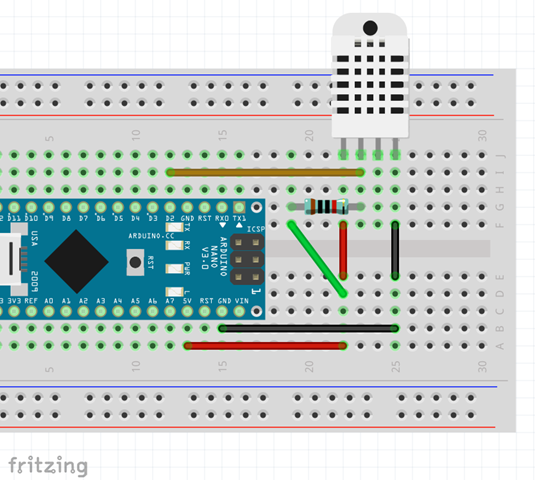
 

DHT22_AM2302_fzz

手持ちに10KΩが見当たらなかったので、5.6K を2つ付けています。センサーからは4Pin 出ていますが、使うのは3本です。
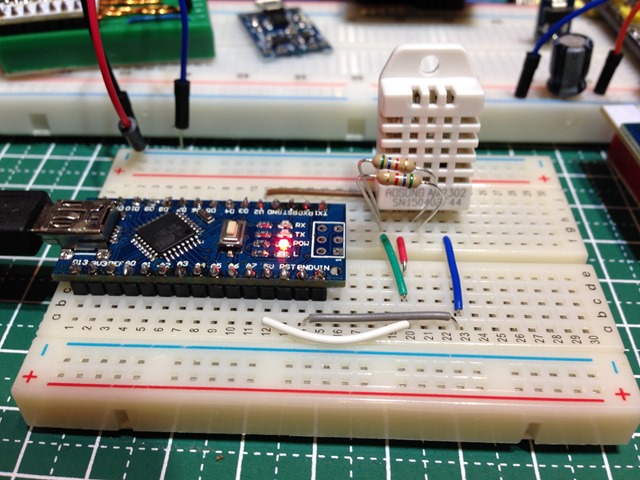
AM2302


https://www.sparkfun.com/datasheets/Sensors/Temperature/DHT22.pdf

3. Technical Specification:
Model DHT22
Power supply 3.3-6V DC
Output signal digital signal via single-bus
Sensing element Polymer capacitor
Operating range humidity 0-100%RH; temperature -40~80Celsius
Accuracy humidity +-2%RH(Max +-5%RH); temperature <+-0.5Celsius
Resolution or sensitivity humidity 0.1%RH; temperature 0.1Celsius
Repeatability humidity +-1%RH; temperature +-0.2Celsius
Humidity hysteresis +-0.3%RH
Long-term Stability +-0.5%RH/year
Sensing period Average: 2s
Interchangeability fully interchangeable
Dimensions small size 14*18*5.5mm; big size 22*28*5mm
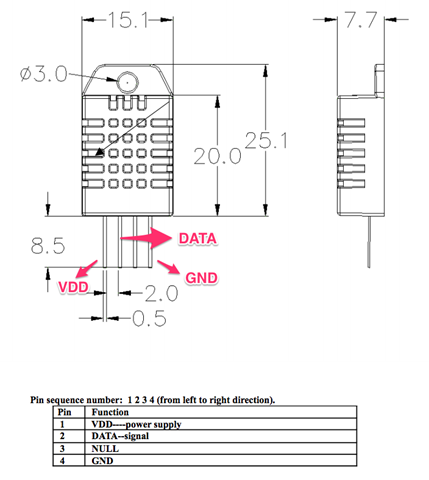
 

datasheets_Sensors_Temperature_DHT22_pdf

コートは、サンプルのです。華氏でシリアルプリントしている部分はいらないので、以下のようにしました。

ライブラリは、以下を使いました。

— Arduino library for DHT11DHT22 —
https://github.com/adafruit/DHT-sensor-library


/*
 AM2302 DHT22 humidity/temperature sensors
 Read test.
 
 --- AM2302 Aosong Guangzhou Electronics Co., Ltd. ---
 3 to 5V power and I/O
 2.5mA max current use during conversion (while requesting data)
 Good for 0-100% humidity readings with 2-5% accuracy
 Good for -40 to 125°C temperature readings ±0.5°C accuracy
 No more than 0.5 Hz sampling rate (once every 2 seconds)
 Body size 15.1mm x 25mm x 7.7mm
 4 pins with 0.1" spacing
 
 --- Arduino library for DHT11DHT22 ---
 https://github.com/adafruit/DHT-sensor-library
 
 JunkHack 2015.06.14
 */

#include "DHT.h"
#define DHTPIN 2     // what pin we're connected to

// Uncomment whatever type you're using!
//#define DHTTYPE DHT11   // DHT 11 
#define DHTTYPE DHT22   // DHT 22  (AM2302)
//#define DHTTYPE DHT21   // DHT 21 (AM2301)

// Initialize DHT sensor for normal 16mhz Arduino
DHT dht(DHTPIN, DHTTYPE);

void setup() {
  Serial.begin(9600); 
  Serial.println("DHT22 AM2302 test!");
 
  dht.begin();
}

void loop() {
  // Wait a few seconds between measurements.
  delay(2000);

  // Reading temperature or humidity takes about 250 milliseconds!
  // Sensor readings may also be up to 2 seconds 'old' (its a very slow sensor)
  float h = dht.readHumidity();
  // Read temperature as Celsius
  float t = dht.readTemperature();
  // Read temperature as Fahrenheit
  float f = dht.readTemperature(true);
  
  // Check if any reads failed and exit early (to try again).
  if (isnan(h) || isnan(t) || isnan(f)) {
    Serial.println("Failed to read from DHT sensor!");
    return;
  }

  // Compute heat index
  // Must send in temp in Fahrenheit!
  float hi = dht.computeHeatIndex(f, h);

  Serial.print("Humidity: "); 
  Serial.print(h);
  Serial.print(" %\t");
  Serial.print("Temperature: "); 
  Serial.print(t);
  Serial.println(" *C ");
}

梅雨時なので、湿度が高いかしらね。温度は、常夏の気温ですが。暑すぎない?

まぁ、こんな感じで湿度と、温度がとられていますね。

DHT22 AM2302 test!
Humidity: 43.10 %    Temperature: 31.30 *C 
Humidity: 43.00 %    Temperature: 31.40 *C 
Humidity: 42.70 %    Temperature: 31.40 *C 
Humidity: 42.40 %    Temperature: 31.40 *C 
Humidity: 42.60 %    Temperature: 31.40 *C 
Humidity: 44.10 %    Temperature: 31.40 *C 
Humidity: 43.80 %    Temperature: 31.40 *C 


今度は、これをESP8266 の ESP-12 で取れるようにしたいです。データを投げつけて IoT デバイスにしたいのですからね。

ちなみに、抵抗を5.6Kのときのデータは以下のようでした。0.3度くらいは低かった感じです。

▼5.6K
DHT22 AM2302 test!
Humidity: 43.10 %    Temperature: 31.20 *C 
Humidity: 45.10 %    Temperature: 31.20 *C 
Humidity: 45.20 %    Temperature: 31.20 *C 
Humidity: 44.60 %    Temperature: 31.20 *C 
Humidity: 44.10 %    Temperature: 31.20 *C 
Humidity: 44.90 %    Temperature: 31.20 *C 
Humidity: 44.10 %    Temperature: 31.20 *C 
Humidity: 43.50 %    Temperature: 31.20 *C 
Humidity: 43.10 %    Temperature: 31.20 *C 

▼11.2K
DHT22 AM2302 test!
Humidity: 42.60 %    Temperature: 31.50 *C 
Humidity: 43.20 %    Temperature: 31.50 *C 
Humidity: 44.00 %    Temperature: 31.50 *C 
Humidity: 43.40 %    Temperature: 31.50 *C 
Humidity: 44.20 %    Temperature: 31.50 *C 
Humidity: 43.50 %    Temperature: 31.50 *C 
Humidity: 44.00 %    Temperature: 31.50 *C 
Humidity: 43.20 %    Temperature: 31.50 *C 
Humidity: 42.70 %    Temperature: 31.50 *C 
Humidity: 43.90 %    Temperature: 31.50 *C 
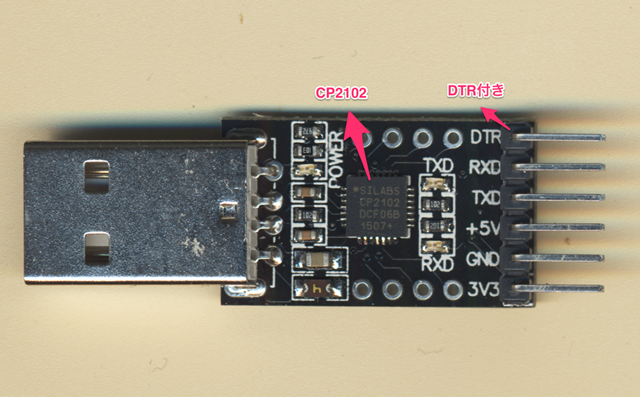
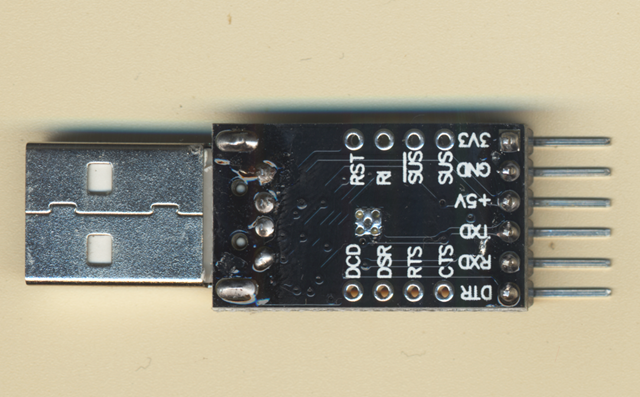
DTR付のCP2102 をゲット

お買い物ついでに、忘れないようDTR付のUSBシリアル変換をゲットしました。

cp2102a

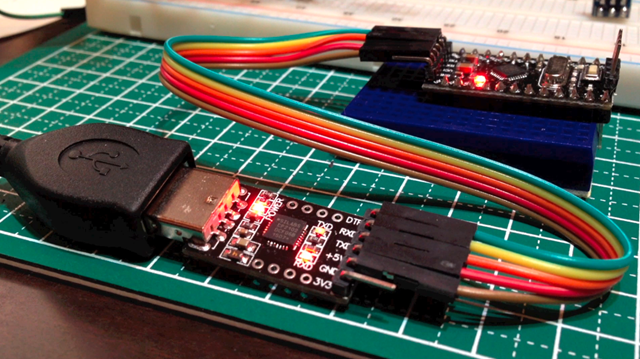
動作確認してみました。

cp2102b

いやぁ、便利ですね。

スクリーンショット_2015_05_17_0_58

前のCP2102 は ESP8266 用にしてこっちは、ProMini用にします。

cp2102

映像はこちら。

[youtube https://www.youtube.com/watch?v=xDVnZ8GZNqc]

ESP8266 ESP-12 spec

ESP-12 モジュールがかなり気に入りました。ので、電源を考えるにあたり、正式なスペックを調査しました。

まず、このモジュールは、FCC のテストにパスしていてその資料がありました。

AdaFruit datasheets

http://www.adafruit.com/datasheets/ESP12FCCtestreport.pdf

FCC ID: 2ADUIESP-12

このレポートは、Shenzhen BCTC Technology Co., Ltd のFCC 認可されている機関のレポートです。

そのほか、細かな資料は、下記からもたどれます。

FCC ID Application Database

http://fccid.net/number.php?fcc=2ADUIESP-12&id=253176#axzz3ZlD9eKZd


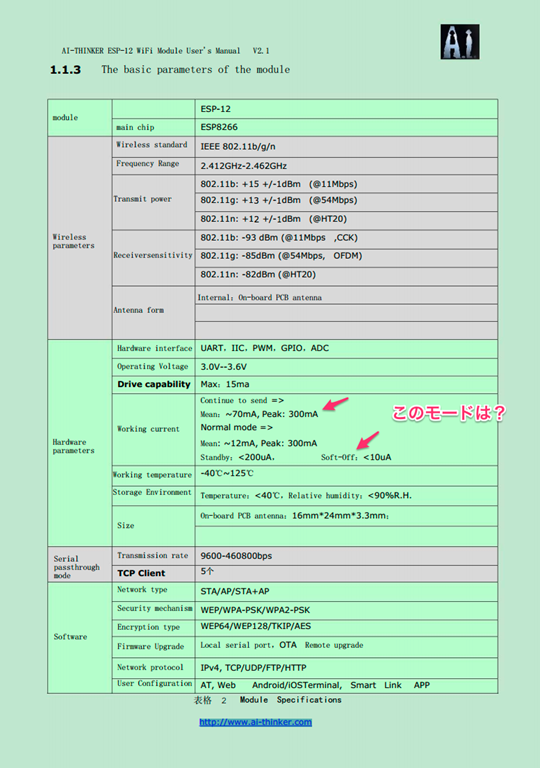
この中のUser Manual を見ると、


AI-THINKER ESP—12 Wifi Manual V1.0 V2.1

http://fccid.net/document.php?id=2487404#axzz3ZlD9eKZd


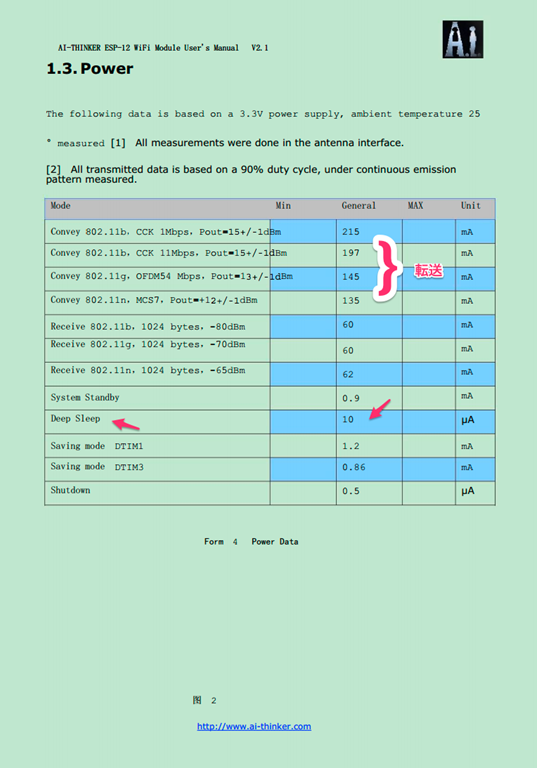
MAXで300mA のようです。Soft-Off モードだとほとんど消費しませんね。これはどうやってこのモードにするんでしょうかね。何かコマンドがあるかとは思いますが。そのうち調べることにします。

FCCID_NET-2487404__1__pdf


FCCID_NET-2487404__1__pdf 2

データをWiFi で飛ばすときは、そこそこ消費するのでSleep させておいて必要なときだけ飛ばすようにすれば電池がもちそうです。データの観測は1分に1回くらいでいいので、そんなプログラムを作ればよさそうですね。


さらなる情報はこちらにありそう。リンクだけメモ。

http://www.ai-thinker.com/

https://twitter.com/EspressifSystem

https://twitter.com/hashtag/ESP8266?src=hash

http://espressif.com/new-sdk-release/

https://learn.adafruit.com/adafruit-huzzah-esp8266-breakout/overview

http://hackaday.com/2015/05/01/review-huzzah-is-the-esp8266-wifi-setup-you-need/

http://blog.squix.ch/2015/05/esp8266-long-term-data-logger-test-with.html

5V 18650 リチウムバッテリー充電モジュール

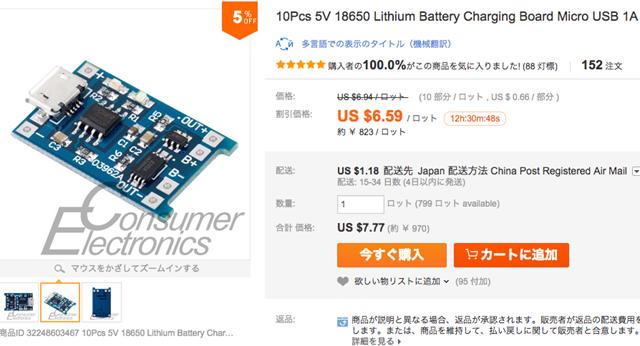
今までで最速で届いた、パーツです。5/1 に発注して9日に到着。このストアはすごくいいですね。

10個で買ったので、1個あたり97円です。

32248603467

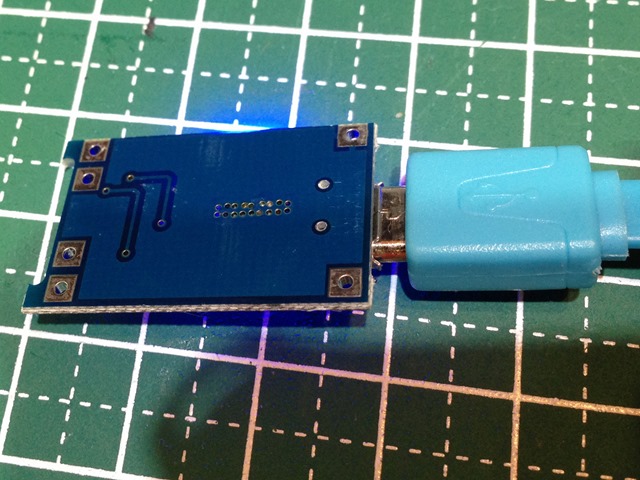
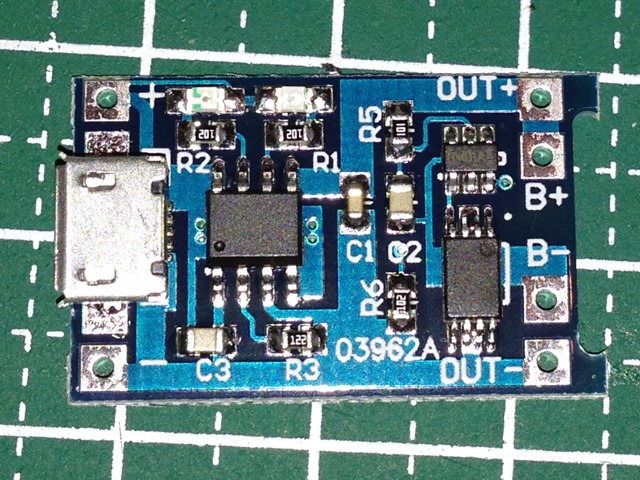
保護回路付で、よくできています。

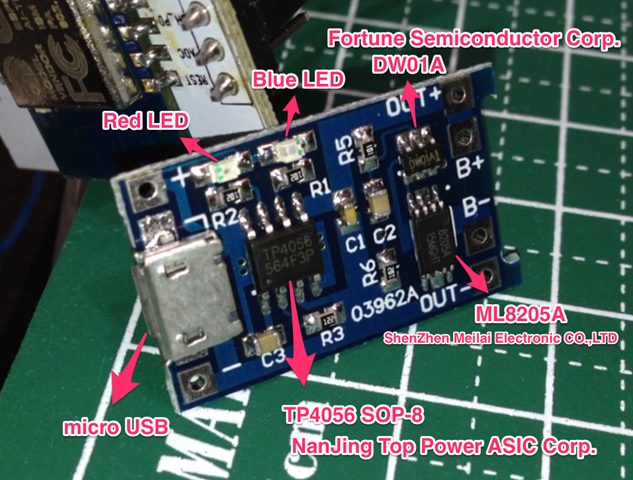
メインのIDは、TP4056 でNanJing Top Power ASIC Corp製。保護回路に、DW01A と ML8205A が乗っています。


TP4056.pdf

http://dlnmh9ip6v2uc.cloudfront.net/datasheets/Prototyping/TP4056.pdf


DW01x-DS-17_EN.pdf

http://www.ic-fortune.com/upload/Download/DW01x-DS-17_EN.pdf


ML8205A

http://www.datasheet4u.com/datasheet/M/L/8/ML8205A-MEILAI.pdf.html


2015_05_10_2_14

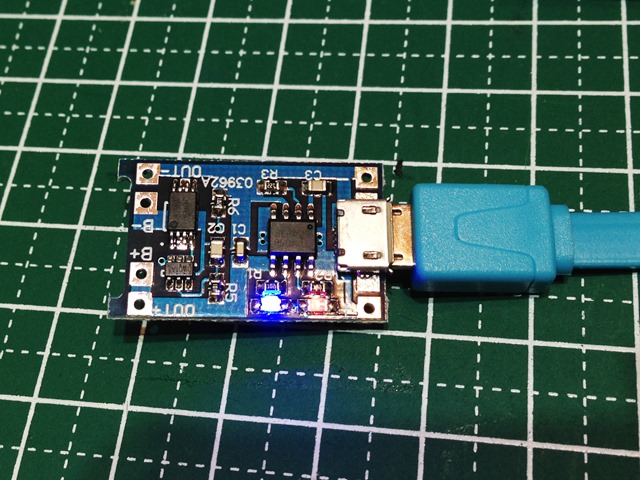
マイクロUSBから給電すると、ブルーLEDがつきます。電池がないと赤LEDは点滅する感じ。

IMG_0275

OUT側の内側は、バッテリーへ。OUT+- は出力へ。

IMG_0276 IMG_0277 

ジュリアンさんの解説映像がわかりやすいです。発音もいいですしね。

[youtube https://www.youtube.com/watch?v=Qw4psECqpwI]

IoTデバイス用にと思っていますが、まだ電池ボックスがないんですよね。あぁ、3Dプリンターがほしいぃ。

ESP12単体で光センサーアナログ読み

Aliexpress経由で購入した素材で遊びました。

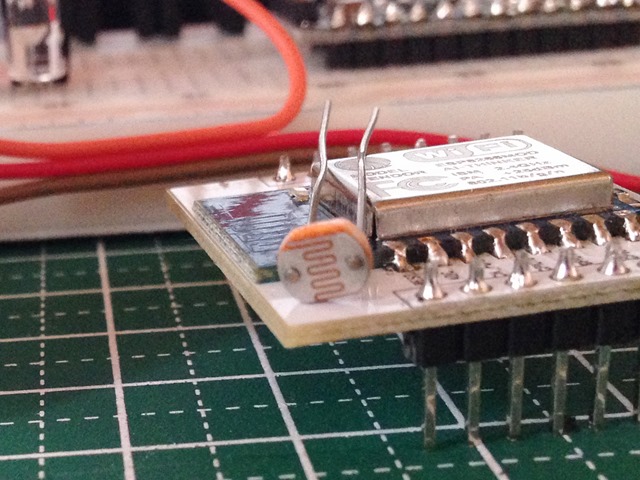
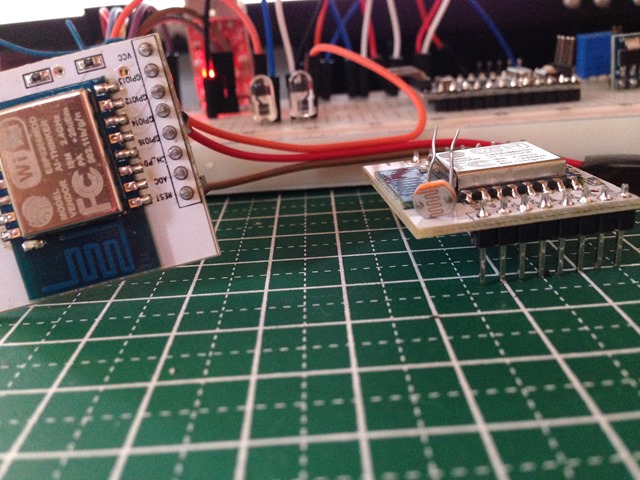
20個で、98円のGL5528光センサーをつけてみました。

IMG_0269

20個で98円ということは、1個あたり約5円ですね。

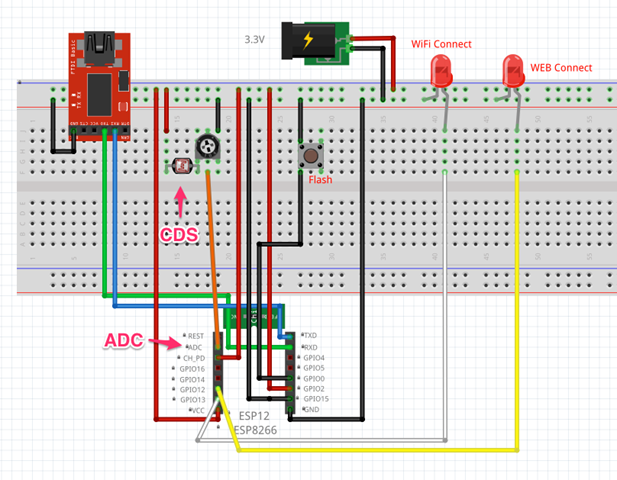
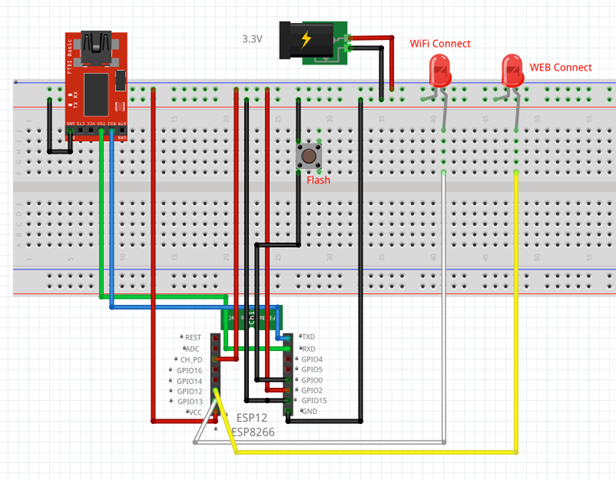
esp12-cde_fzz_-_Fritzing_-__ブレッドボード_ビュー_

ADC にこんな感じでつけてみました。

当初ADC Pinにつけても値が拾えず、抵抗値を可変で調整したらうまく値が取れました。このADC-GND間の電圧は、強い光を当てた状態で約1.13Vくらいです。夜、電気をつけた状態で0.98Vくらい。手で覆うと0.6Vくらいになる感じです。


コードは以下のようです。エラー処理が抜けているのか、バグがあるのかわかりませんがちょっと不安定です。

/*
 ESP8266 HTTP get webclient.
 ADC Read test.
 https://thingspeak.com/channels/37124
 Arduino-compatible IDE with ESP8266
 arduino-1.6.1-macosx-java-latest-signed.zip
 https://github.com/esp8266/Arduino
 JunkHack 2015.05.09
 */
 
#include <ESP8266WiFi.h>
 
const char* ssid     = "JunkHack";
const char* password = "testtest";
 
const char* host = "184.106.153.149";

int WiFiConLed = 13;
int WEBconLed = 12;

void setup() {
  pinMode(WiFiConLed, OUTPUT);
  pinMode(WEBconLed, OUTPUT);
  Serial.begin(115200);
  delay(10);
 
  // We start by connecting to a WiFi network
 
  Serial.println();
  Serial.println();
  Serial.print("Connecting to ");
  Serial.println(ssid);
 
  WiFi.begin(ssid, password);
 
  while (WiFi.status() != WL_CONNECTED) {
    delay(500);
    Serial.print(".");
    digitalWrite(WiFiConLed, HIGH);
    delay(400);
    digitalWrite(WiFiConLed, LOW);
    delay(100);
  }
 
  Serial.println("");
  Serial.println("WiFi connected");
  Serial.println("IP address: ");
  Serial.println(WiFi.localIP());
}
 
int value = 0;
int count = 0;
int adc = 0;

void loop() {
  delay(5000);
  ++value;
 
  Serial.print("connecting to ");
  Serial.println(host);
 
  // Use WiFiClient class to create TCP connections
  WiFiClient client;
  const int httpPort = 80;
  if (!client.connect(host, httpPort)) {
    Serial.println("connection failed");
    return;
  }
  
  digitalWrite(WEBconLed, HIGH);
  delay(1000);
  count += 1;

  Serial.print("ADC: ");
  adc = analogRead(A0);
  Serial.println(adc);
 
  // We now create a URI for the request
  String url = "/update?key=5GPL7J7EVNB5R8GE&field1=";
  url += adc;
  Serial.print("Requesting URL: ");
  Serial.println(url);
 
  // This will send the request to the server
  client.print(String("GET ") + url + " HTTP/1.1\r\n" +
               "Host: " + host + "\r\n" +
               "Connection: close\r\n\r\n");
  delay(10);
 
  // Read all the lines of the reply from server and print them to Serial
  while(client.available()){
    String line = client.readStringUntil('\r');
    Serial.print(line);
  }
 
  // Close connection
  Serial.println();
  Serial.println("closing connection");
  digitalWrite(WEBconLed, LOW);
}


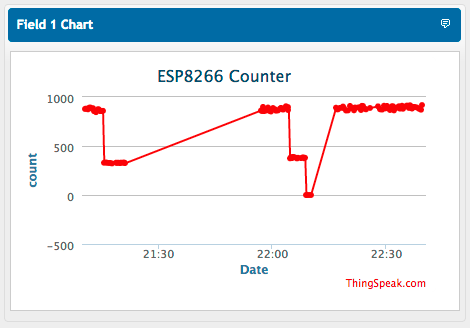
とりあえず、こんな感じで、データが投げられています。

ESP12_-_ThingSpeak

ESP12単体でwifi connection

単体でWifi に接続して、データをThingSpeak に投げるテストをしてみました。


IMG_0269

配線はこんな感じで、GPIO12 と 13 にLEDをくっ付けてみました。アクセスポイントにコネクションしたときにダブルブリンク、WEBにコネクションしているときは、点灯する感じです。

スクリーンショット 2015-05-09 16.13.41

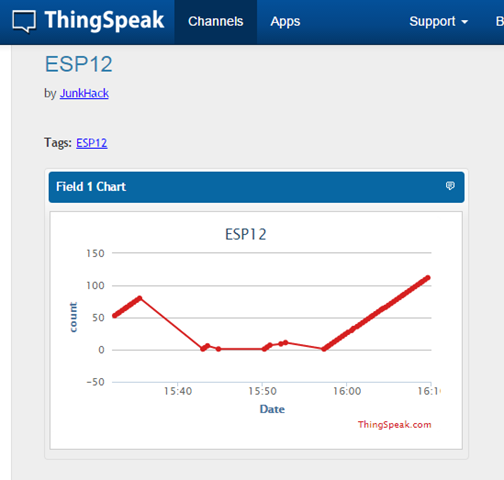
まだ、センサーとかはつけていないのでカウンター値を上げてみました。

imageほほー、簡単ですね。


コードはこんな感じです。

/*
 ESP8266 HTTP get webclient test.
 https://thingspeak.com/channels/37124
 Arduino-compatible IDE with ESP8266
 arduino-1.6.1-macosx-java-latest-signed.zip
 https://github.com/esp8266/Arduino
 JunkHack 2015.05.09
 */
 
#include <ESP8266WiFi.h>
 
const char* ssid     = "JunkHack";
const char* password = "testtest";
 
const char* host = "184.106.153.149";
 
void setup() {
  pinMode(13, OUTPUT);
  pinMode(12, OUTPUT);
  Serial.begin(115200);
  delay(10);
 
  // We start by connecting to a WiFi network
 
  Serial.println();
  Serial.println();
  Serial.print("Connecting to ");
  Serial.println(ssid);
 
  WiFi.begin(ssid, password);
 
  while (WiFi.status() != WL_CONNECTED) {
    delay(500);
    Serial.print(".");
    digitalWrite(13, HIGH);
    delay(400);
    digitalWrite(13, LOW);
    delay(100);
  }
 
  Serial.println("");
  Serial.println("WiFi connected");
  Serial.println("IP address: ");
  Serial.println(WiFi.localIP());
}
 
int value = 0;
int count = 0;
 
void loop() {
  delay(5000);
  ++value;
 
  Serial.print("connecting to ");
  Serial.println(host);
 
  // Use WiFiClient class to create TCP connections
  WiFiClient client;
  const int httpPort = 80;
  if (!client.connect(host, httpPort)) {
    Serial.println("connection failed");
    return;
  }
  
  digitalWrite(12, HIGH);
  delay(1000);
  count += 1;

 
  // We now create a URI for the request
  String url = "/update?key=5GPL7J7EVNB5R8GE&field1=";
  url += count;
  Serial.print("Requesting URL: ");
  Serial.println(url);
 
  // This will send the request to the server
  client.print(String("GET ") + url + " HTTP/1.1\r\n" +
               "Host: " + host + "\r\n" +
               "Connection: close\r\n\r\n");
  delay(10);
 
  // Read all the lines of the reply from server and print them to Serial
  while(client.available()){
    String line = client.readStringUntil('\r');
    Serial.print(line);
  }
 
  // Close connection
  Serial.println();
  Serial.println("closing connection");
  digitalWrite(12, LOW);
}

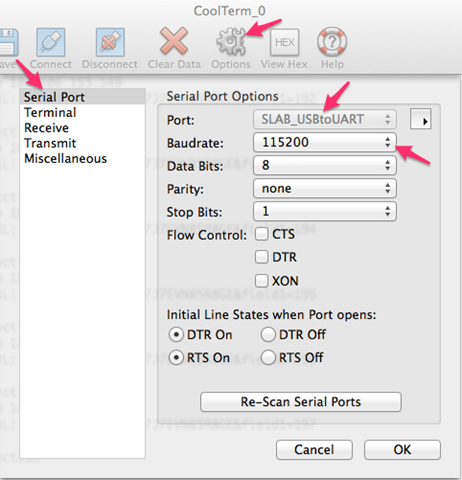
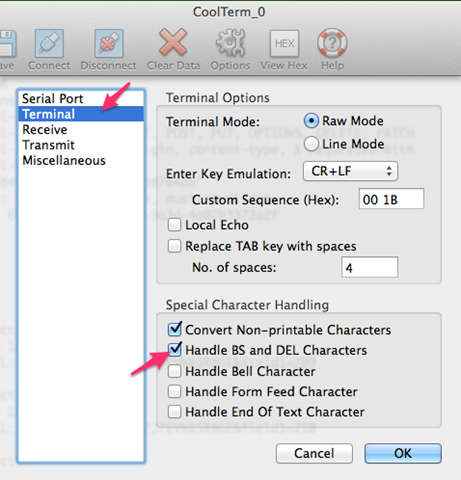
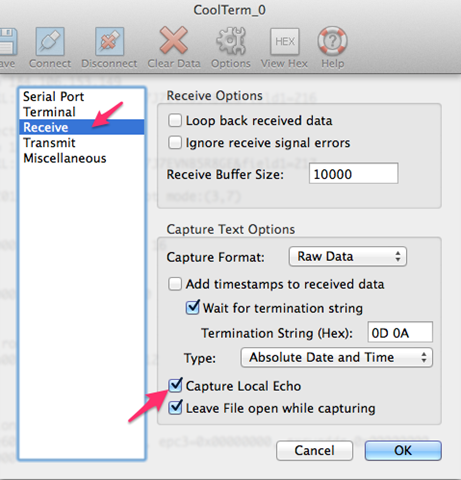
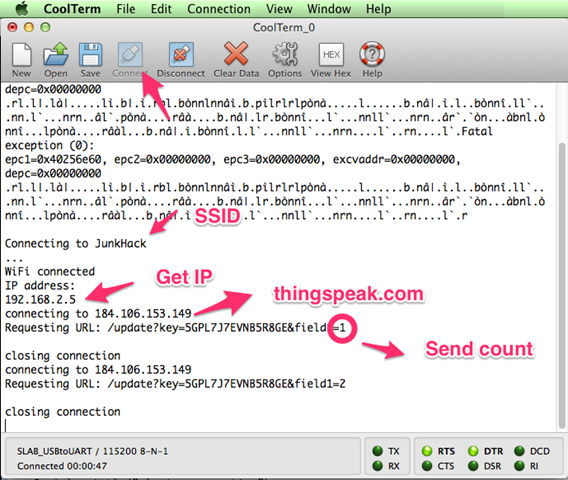
ArduinoIDE のシリアルモニターでも見れますが、osx のCoolTermでは以下のように見れます。

Connection_Options__CoolTerm_0__と_CoolTerm_0


Menubar_と_Connection_Options__CoolTerm_0__と_CoolTerm_0


Connection_Options__CoolTerm_0__と_CoolTerm_0 2


Menubar_と_CoolTerm_0_と_Windows7__Running_


参考にさせて頂いたページ

ESP8266モジュールをArduinoとして使う

http://ehbtj.com/electronics/esp8266-as-arduino


ESP8266をUSB-TTLシリアル変換してWi-Fiの確認する

http://qiita.com/masato/items/a3b71f8a17b876be8f76


ESP8266 Wifi Temperature Logger

http://www.instructables.com/id/ESP8266-Wifi-Temperature-Logger/?lang=ja&ALLSTEPS